

Wi-Fi 7 Unleashed
Wi-Fi, the ubiquitous wireless technology that keeps us connected, has come a long way since its beginning. The evolution of Wi-Fi standards has taken us from these dial-up days to an era of blazing-fast connectivity. Today, let’s take a trip through the history of Wi-Fi, exploring its past and evolution, and what the future holds for our wireless world.
Evolution of Wi-Fi Standards
- The Early Days: 802.11b Wi-Fi 1* (1999)
Imagine dial-up internet, but slower. That’s essentially what 802.11b offered, with a maximum speed of 11 Mbps (megabits per second) on the 2.4 GHz frequency. It was enough for basic web browsing and email, but forget about streaming or video calls. - Opened Door to the 5 GHz Band: 11a Wi-Fi 2* (1999)
802.11a focus on the 5 GHz band offered better performance but faced challenges with range and penetration through walls and obstacles. Additionally, its higher power consumption and limited device compatibility meant it wasn’t a universal solution. - Picking Up the Pace: 802.11g Wi-Fi 3* (2003)
11g standard has extended link rate to up to 54 Mbps using the same 20 MHz bandwidth as 802.11b uses to achieve 11 Mbps. 802.11g hardware is fully backward compatible with 802.11b hardware. It was rapidly adopted by consumers starting in January 2003, due to the desire for higher speeds and reductions in manufacturing costs. Despite its major acceptance, 802.11g suffers from the same interference as 802.11b in the already crowded 2.4 GHz range.
Note: Wi‑Fi 1, 2, and 3 are named by retroactive inference. They do not exist in the official nomenclature.
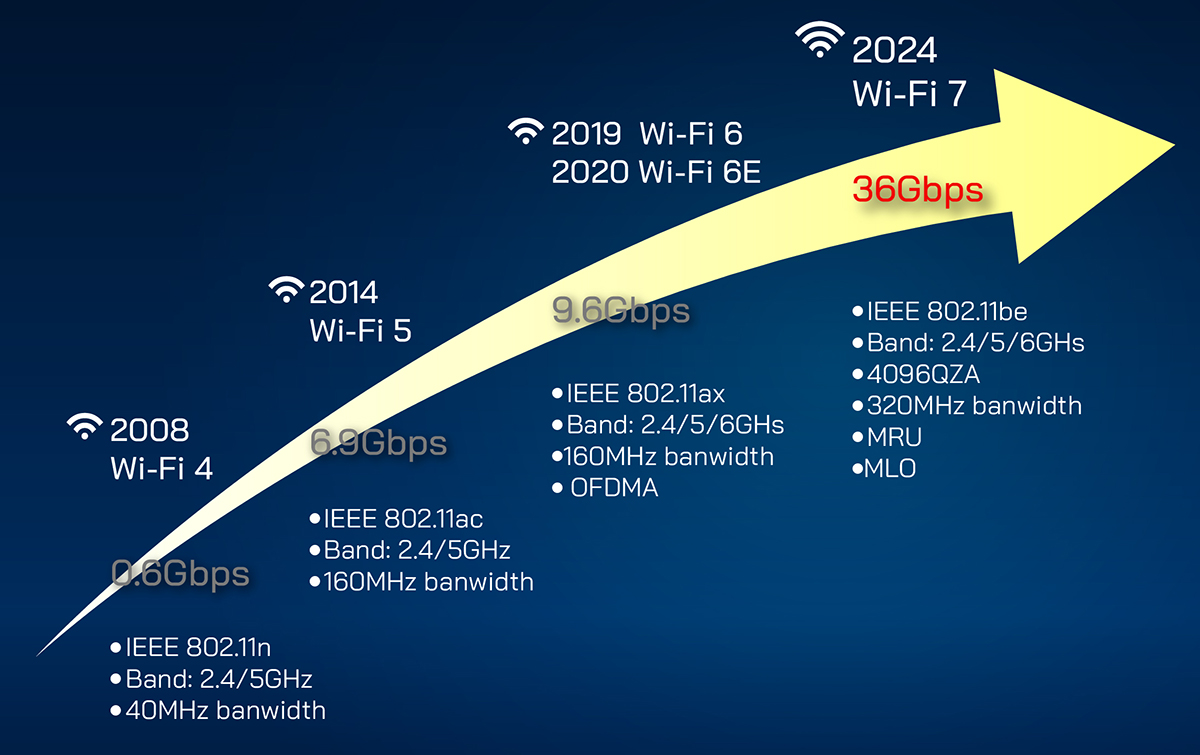
- The Wireless Revol802ution: 802.11n Wi-Fi 4 (2008)
11n Wi-Fi 4 was a game-changer. It introduced MIMO (Multiple-Input, Multiple-Output) technology, which used multiple antennas to send and receive data simultaneously, boosting speeds to a theoretical maximum of 600 Mbps. - Push the Boundaries Further: 802.11ac Wi-Fi 5 (2014)
11ac, also known as Wi-Fi 5, pushed the boundaries further with wider channels on the 5 GHz band and even more advanced MIMO techniques. This translated to speeds of up to 6.9 Gbps, making it ideal for demanding applications like 4K streaming and online gaming with minimal lag. - Faster than Ever: 802.11ax Wi-Fi 6(2019) & Wi-Fi 6E(2020)
11ax is the latest IEEE standard from the Wi-Fi Alliance for wireless networks. It operates in the 2.4 GHz and 5 GHz bands, with an extended version, Wi-Fi 6E, that adds the 6 GHz band. Wi-Fi 6 delivers theoretical speeds of up to 9.6 Gbps, ensuring a seamless and reliable connection for multiple devices simultaneously.
The Future is Now: 802.11be Wi-Fi 7 (2024)
With the higher networking performance demands and a more responsive connectivity environment, Wi-Fi 7 represents the next step into the future.
 .
.
Wi-Fi 7 Key Insights
- Faster: Close to 4X the wireless datalink performance, delivering over 36Gbps.
- More Reliable: New Multiple Resource Unit (MRU) lowers multiple user latency by 25%.
- Always-on Connected: New Multi-Link Operation (MLO) improves single user latency by 80% and throughput gains of up to 300%.
Major Features
Let’s take a look at the major features that have been approved as of Draft 3.0:
4096-QAM
Wi-Fi 7 enables significantly faster speeds by packing more data into each transmission. 320 MHz channels are twice the size of previous Wi-Fi generations. 4096-QAM (Quadrature Amplitude Modulation, 4K-QAM) enables each signal to more densely embed greater amounts of data compared to the 1K QAM with Wi-Fi 6/6E, resulting in 20% higher theoretical transmission rates.
MRU and Puncturing
OFDMA (Orthogonal Frequency Division Multiple Access) was introduced in Wi-Fi 6. It divides the radio channel into smaller frequency allocations called RU (Resource Units). Wi-Fi 7 builds on this foundation with a new MRU (Multiple RU) feature. By partitioning the channel, smaller data packets can be transmitted to multiple users simultaneously, which increases throughput and reduces latency in a dense environment. With legacy Wi-Fi 6/6E, when any part of a large high-speed channel is being used by another device, the entire channel is unavailable—and a different channel must be used. With Multi-RU Puncturing, Wi-Fi 7 devices will be able to use other parts of the same high-speed channel not in use to utilize very large channels.
MLO
Multi-Link Operation (MLO) is an aggregation of multiple bands or channels. With MLO, multi-link devices can simultaneously use the 2.4GHz, 5GHz and 6GHz bands under different circumstances, including load balancing according to traffic needs, or data aggregation across multiple bands, which significantly improves overall speeds and greatly reduces connection latency for all connected users highlighting network traffic can still flow seamlessly even if there is interference or congestion. MLO technology will be critical for delivering faster and more reliable video streaming and anything else that requires constant, sustained and real-time throughput.
Conclusion
Development of the Wi-Fi 7 amendment is ongoing with a final version expected by Q1 2024, so the key new technologies introduced in this blog do not cover all its new features. Given these short-listed new features, the Wi-Fi 7 significant enhancements are already expected to allow Wi-Fi to retain the scalability required for the future, increasing adoption of use cases, even when there are strict latency and reliability requirements. AEWIN as a professional provider of network appliance, industrial server and Edge AI solutions, we are constantly embracing new technologies and developing various platforms that deliver huge performance and IOPS, connectivity, scalability, reliability and data management to be able to handle the applications and growth a business need. Please let us know if you have any questions or comments about AEWIN’s platforms. Feel free to reach out to our friendly sales!